
Trace Right!1.2 - App Store
You'll be able to see results in few seconds.
Publisher Description
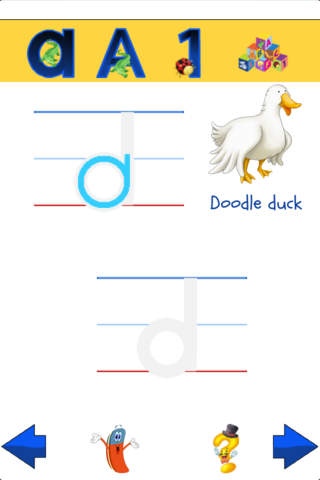
Trace Right! brings alphabet and number tracing to your child's fingertips.
Trace Right! has the smarts to let your children know how they did! No more "Good job!" from you is required!
Trace Right! encourages proper stroke order and direction in tracing.
With Trace Right!, you can
* Watch animated tracing of a letter or a number
* Follow the animation and trace on your own
* Check with "Mr.Q", the question mark to see how you did
* Hear words of approval and encouragement
* Get visual feedback on your traced path
* Enjoy animal alphabet pals who can talk!
* Navigate using intuition and fingertip
We love to hear from you. Please review or rate the app now!!
Also, check out our latest fascinating iPad app - "Murky Reef"!!
Privacy Disclosure: We respect and value your privacy at Frolyc. We do not collect personally identifiable information. We do NOT have links to social media, ads, external websites or in-app purchases within this app. To view our privacy policy, visit www.frolyc.com.
Requires iOS 4.2 or later. Compatible with iPhone, iPad, and iPod touch.
About Trace Right!
The company that develops Trace Right! is Nirupama Bala. The latest version released by its developer is 1.2.
To install Trace Right! on your iOS device, just click the green Continue To App button above to start the installation process. The app is listed on our website since 2011-02-25 and was downloaded 0 times. We have already checked if the download link is safe, however for your own protection we recommend that you scan the downloaded app with your antivirus. Your antivirus may detect the Trace Right! as malware if the download link is broken.
How to install Trace Right! on your iOS device:
- Click on the Continue To App button on our website. This will redirect you to the App Store.
- Once the Trace Right! is shown in the iTunes listing of your iOS device, you can start its download and installation. Tap on the GET button to the right of the app to start downloading it.
- If you are not logged-in the iOS appstore app, you'll be prompted for your your Apple ID and/or password.
- After Trace Right! is downloaded, you'll see an INSTALL button to the right. Tap on it to start the actual installation of the iOS app.
- Once installation is finished you can tap on the OPEN button to start it. Its icon will also be added to your device home screen.
Program Details
System requirements
Download information
Pricing
Version History
version 1.2
posted on 2011-02-25
Disclaimer
Official App Store Link
We do not host Trace Right! on our servers. We did not scan it for viruses, adware, spyware or other type of malware. This app is hosted by Apple and passed their terms and conditions to be listed there. We recommend caution when installing it.
The App Store link for Trace Right! is provided to you by apps112.com without any warranties, representations or guarantees of any kind, so access it at your own risk.
If you have questions regarding this particular app contact the publisher directly. For questions about the functionalities of apps112.com contact us.
